Agentic Football Cup 72-Hour Pre-Test — From Harness to Local Observability
When: July 3, 2026 16:00 — July 6, 2026 16:00 (72 hours)
Organizer: Amazon Web Services China User Group
Goal: De-risk the first Agentic Football Cup Beijing UG Workshop
Wrap-up: Community live stream on July 5 at 20:00
Open-source toolchain: sample-ai-possibilities / agentic-football-sample-agents (branch football-workshop)
Background: the Agentic Football Cup Workshop

Image source: agenticfootballcup.com
Agentic Football Cup is a free half-day workshop (~4 hours) from AWS with a very direct tagline — Build AI Agents. Watch them compete. Through a 2D pixel-art football game you get hands-on with Amazon Bedrock AgentCore, CloudWatch, and related Agentic AI services: every player on the pitch is an autonomous AI agent. No scripts, pure emergent play.
As the official Learn More page puts it, "the football is the learning vehicle" — every pattern used in the match maps to a production agentic workload:
| Official quick facts | Details |
|---|---|
| Format | Free half-day (~4h); private sessions for orgs or public sessions for individuals |
| Reach | Regular workshops in major cities worldwide (Shanghai and Beijing both on the list), in EN / JA / KO / ES / PT-BR |
| What you learn | Multi-agent coordination & orchestration, real-time state management, tool use & structured output, guardrails & retry strategies, observability & debugging agent reasoning, prompt engineering for autonomous systems |
| Tech stack | Amazon Bedrock, Bedrock AgentCore (managed runtime), Strands Agents SDK, Kiro IDE, Nova / Claude or any Bedrock model — deployed in your own AWS account |
| Architecture | 10 autonomous agents called in parallel every 2 seconds, each decision targeted under 500ms |
| Touchline coaching | Type instructions from the sideline mid-match and watch your agents reason about whether to follow them |
| Path to Vegas | Completing a workshop qualifies you for the global league; group winners play for the grand prize live on stage at AWS re:Invent 2026 in Las Vegas |
Signup (public session or private booking) takes a minute on the official site.
From your laptop to Las Vegas: the qualification path
This deserves its own highlight — finishing the workshop is not the end, it is the entry ticket to the global league:
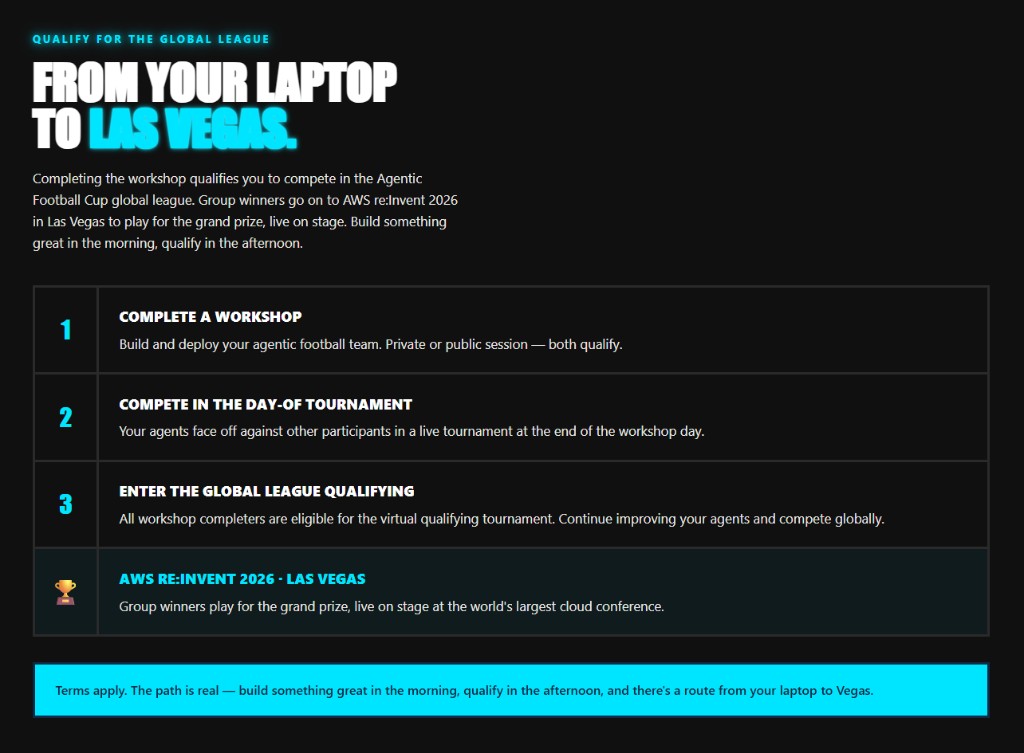
Image source: agenticfootballcup.com/learnmore
- Complete a Workshop — private or public session, build and deploy your agentic football team
- Compete in the Day-of Tournament — your agents face off against other participants live at the end of the workshop day
- Enter the Global League Qualifying — all workshop completers are eligible for the virtual qualifying tournament; keep improving your agents and compete globally
- 🏆 AWS re:Invent 2026 · Las Vegas — group winners play for the grand prize, live on stage at the world's largest cloud conference
In the official words: "The path is real — build something great in the morning, qualify in the afternoon, and there's a route from your laptop to Vegas."
Matches are 5v5, with five positions per team: GK / DEF / MID / FWD1 / FWD2. The key idea: every player is an independent agent deployed on AgentCore Runtime — with its own system prompt, its own model, its own fallback rules, invoked independently on every decision tick. You are not "playing a game"; you are operating five production agents at once.
The Portal also gamifies AgentCore's capabilities: the trophy wall maps to Runtime, Memory, Code Interpreter, Browser, Identity, Gateway, Observability, Bedrock, Guardrails, and Evaluations, with daily quests and XP. By the time you have played a few matches, you have toured the AgentCore product map.
Three ways to create agent players:
| Method | Best for | Highlights |
|---|---|---|
| AgentCore Harness (GUI) | Quick start, no local setup | Configure prompts and models in the browser |
| CloudShell | AWS account, no local tools | One-shot deploy from the cloud terminal |
| Local deploy (Kiro, etc.) | Deep customization | Develop agent code locally, push to AgentCore Runtime |
During the pre-test we used Harness first, then switched to local deploy — Harness validates the happy path in an hour or two; local deploy unlocks everything covered below: an observability platform, heatmaps, AI tuning advice, deterministic overrides, and Playwright automation.
Timeline
Phase 1: Harness Quick Validation
With AgentCore Harness we created and deployed agent players entirely in the browser — write the player prompt, pick a model, deploy. It confirmed three things:
- AgentCore Runtime accepts match requests
- The Portal runs games and emits DECISION logs to CloudWatch
- Basic prompt / fallback flows work
That took about 1–2 hours and built the mental model for local development. If you just want a taste, Harness is enough; to go deeper, go local.
Phase 2: Local Deploy & Game Mechanics
One team = five independent agents
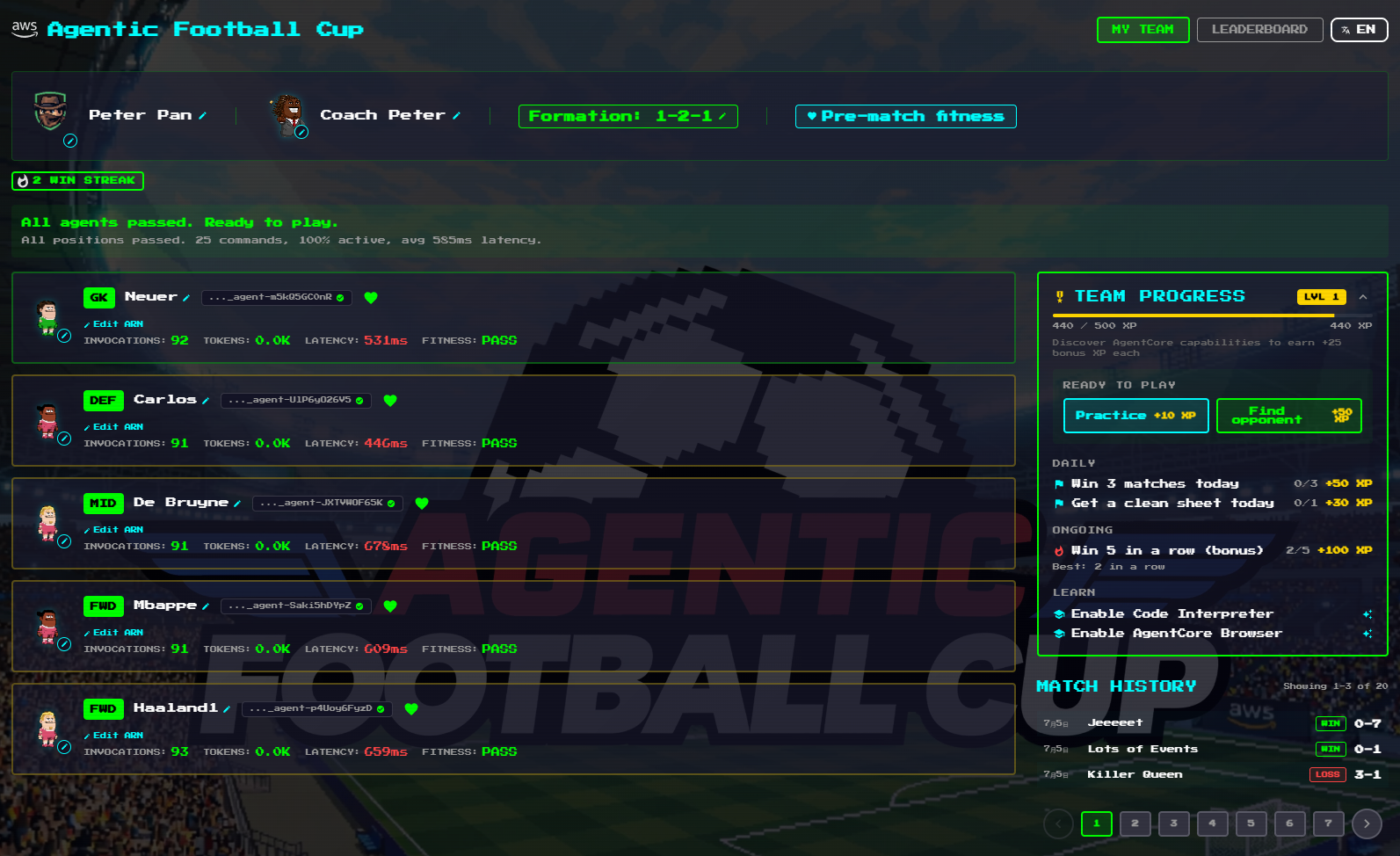
The "My Team" page makes the architecture explicit: every player card is bound to an Agent ARN on AgentCore Runtime, showing live invocation counts, token usage, response latency, and a pre-match fitness check.
Details worth noting:
- Configurable formation (1-2-1 in the screenshot): each of the five positions is defined by its own system prompt — changing formation means changing the prompt mix
- Latency is a stat: the screenshot shows GK 531ms, DEF 446ms, MID 675ms — slow agents miss decision windows and it shows on the pitch
- The repo ships several team templates:
ai-team-strands-balanced,extremely-aggressive,extremely-defensive,gateway,memory, deployable as a whole squad viadeploy-wsl.sh
How a match runs: ~2 seconds per tick
The match clock runs about 120 seconds, advancing one tick every ~2 seconds. On each tick all five players invoke their agents and return one command each:
MOVE_TO, PASS, SHOOT, MARK, SLIDE_TACKLE, PRESS_BALL, INTERCEPT, GK_DISTRIBUTE, CLEAR, …
A full match adds up to 300–600 agent invocations per team. Responses slower than ~900ms risk timing out, in which case the game falls back to deterministic rules — so a well-written prompt matters exactly as much as a fast response.
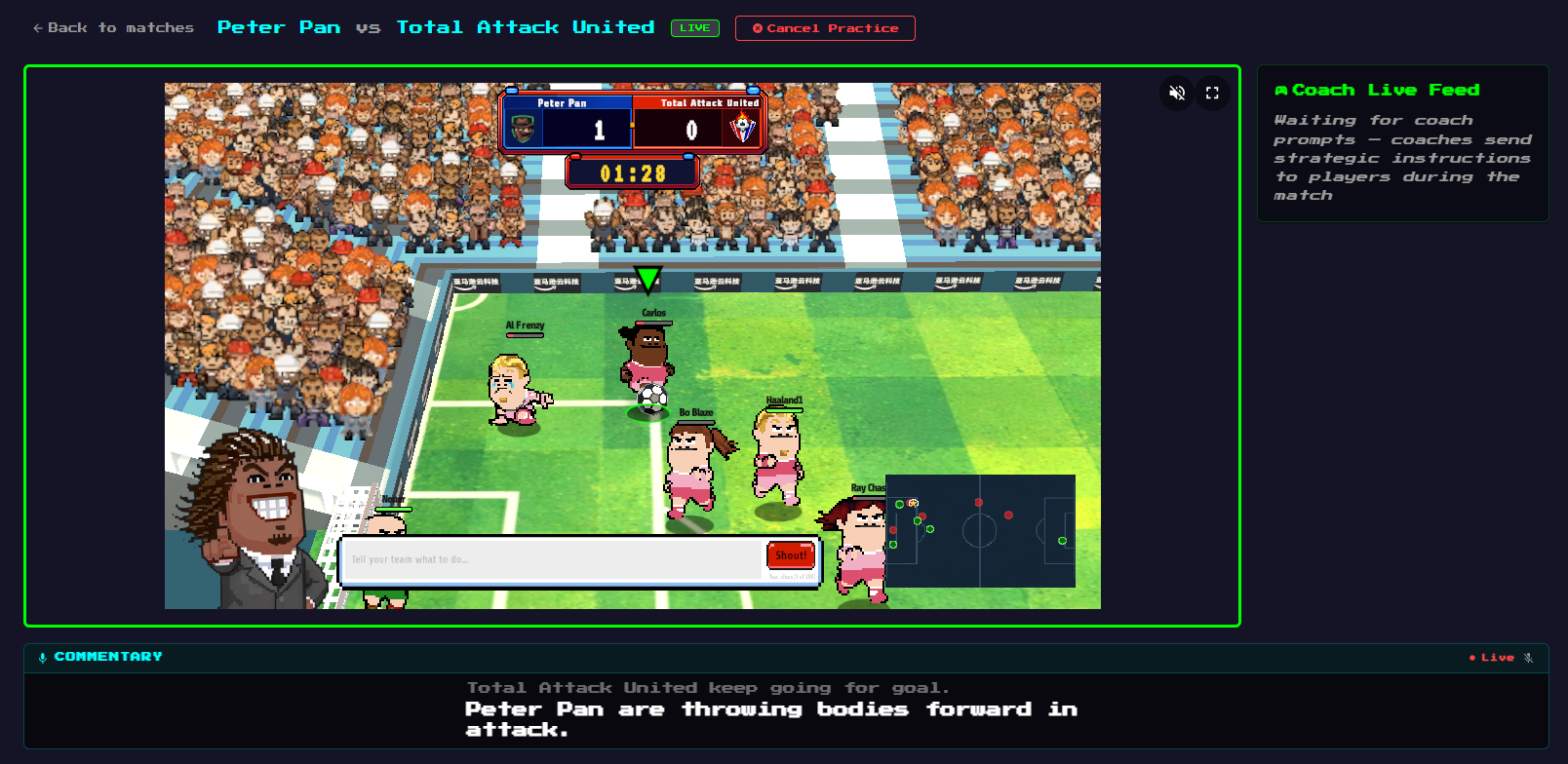
The match screen is dense: live score and clock, per-player nameplates, a tactical minimap, and AI-generated commentary at the bottom. Note the coach shout box at the bottom left — you can send natural-language tactical instructions to your team mid-match. That input box returns in our Playwright experiment later.
Post-match reports and "Behind the Scenes"
Every match produces two layers of reporting. The first is the full-time page: winner, MVP, fastest agent, possession, shots, and the goal timeline.
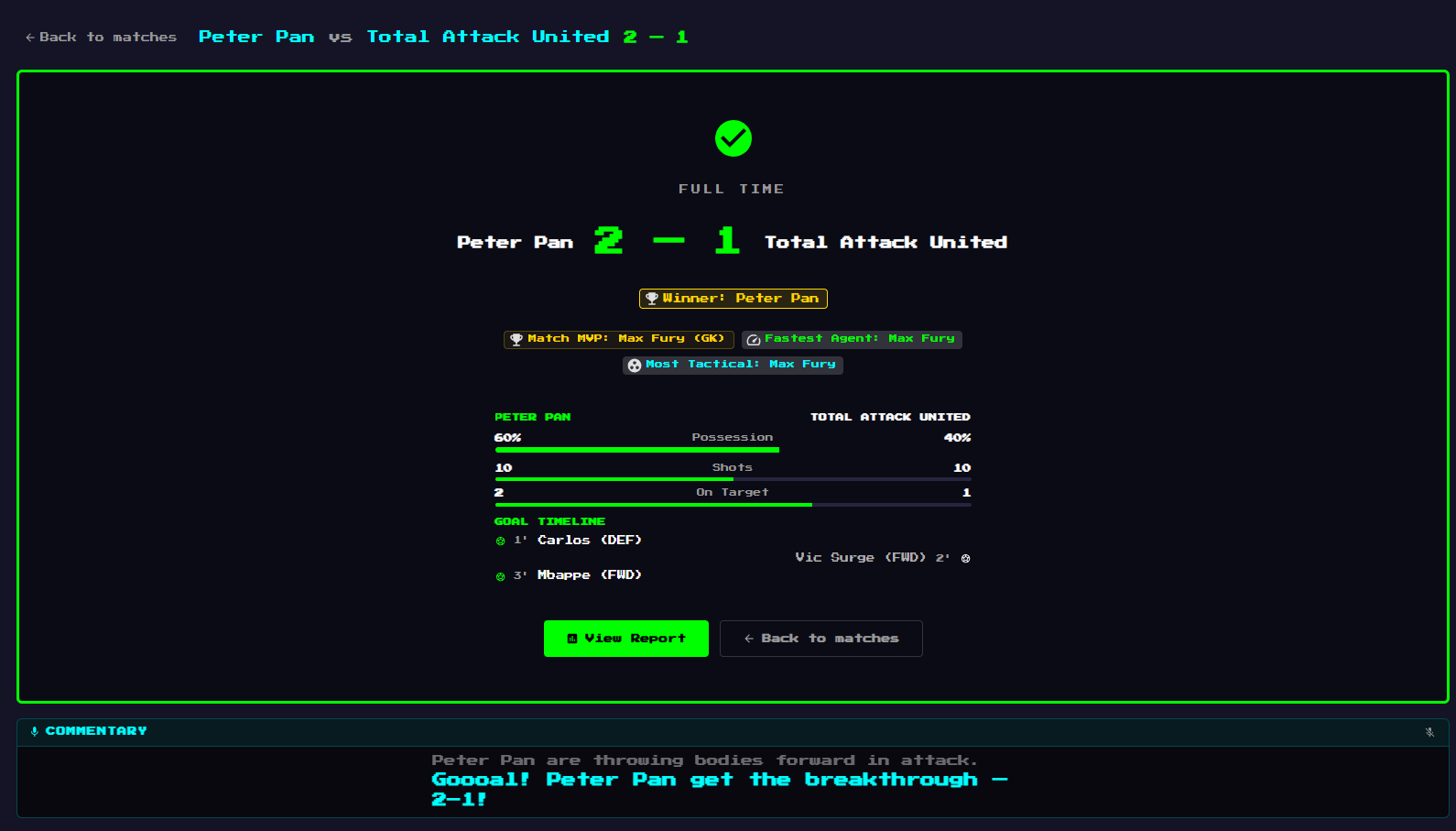
The second layer is Behind the Scenes — a report written for agent developers: an AI-generated match summary and per-goal narrative, a command breakdown for both teams (what every agent decided all match), a "Coach's Corner" with tactical advice, and per-position latency and success rates.
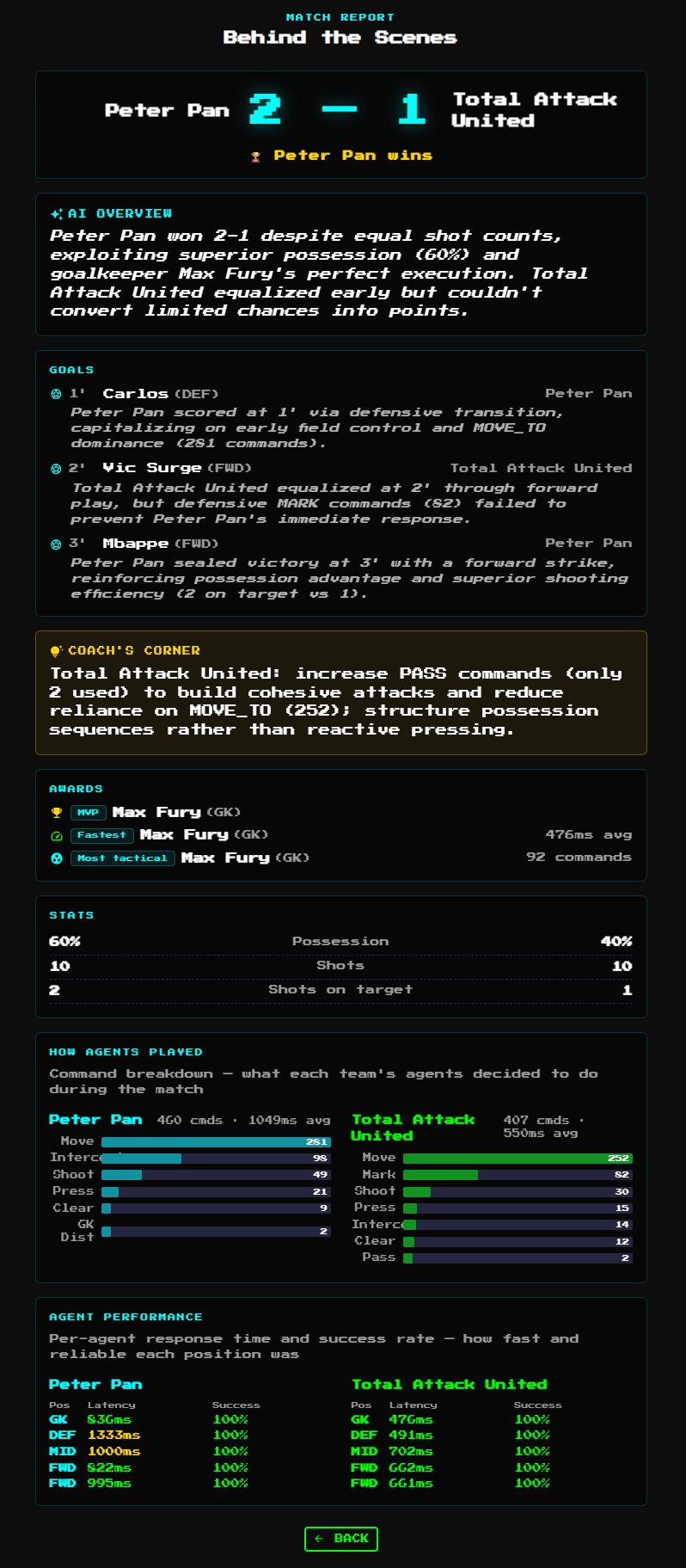
This report earns its keep. In the 2-1 win above, our team averaged 1049ms per command against the opponent's 550ms, and our DEF spiked to 1333ms — we won on tactics while losing on latency. That observation directly drove two of our next steps: switching to faster models per position, and building our own observability platform.
Overrides: the blast shot
The game lets agent code apply deterministic overrides — tactical actions taken by code, bypassing the LLM. We gave our forwards a blast shot: inside the shooting zone with a good angle, the code fires SHOOT at full power with zero LLM hesitation. Other overrides in our team include mark-near, tackle, hold-line, no-chase, and support; the analytics page later counts how often each one triggers.
The blast shot measurably raised goals and win rate. The division of labor became clear: the LLM reads the game, the code pulls the trigger.
Prompt & fallback tuning
- Prompts: push forwards, link midfield, mark tightly, cut useless sideways passes
- Output format: LLMs occasionally chat outside the JSON, breaking parsing. Our dashboard later turned this into an alert:
parse-fallback 34/255: LLM output drifting from pure JSON — tighten the response format section or lower temperature - Fallbacks: deterministic rules when the LLM times out or returns an invalid action (clearances, keeper hold). But fallbacks cut both ways — in training mode we once caught the team playing entirely on rules with 0% LLM decisions (next chapter)
Per-position model selection
With the latency numbers in front of us, the natural next step was different Bedrock models for different positions. We benchmarked candidates with bench_models.py and settled on:
- FWD / MID:
amazon.nova-2-lite-v1:0(stronger reasoning for attacking decisions) - DEF / GK:
amazon.nova-micro-v1:0(lower latency for defensive reactions)
Goalkeepers must answer inside the tick window; this split held up in practice.
Phase 3: Observability Platform
The biggest payoff of going local: you can pull CloudWatch DECISION logs and Portal results into your own analysis. We built and open-sourced an observability toolchain (in agentic-football-sample-agents/), with a bilingual English/Chinese UI.
Architecture
Dashboard home: five position cards + latency scatter
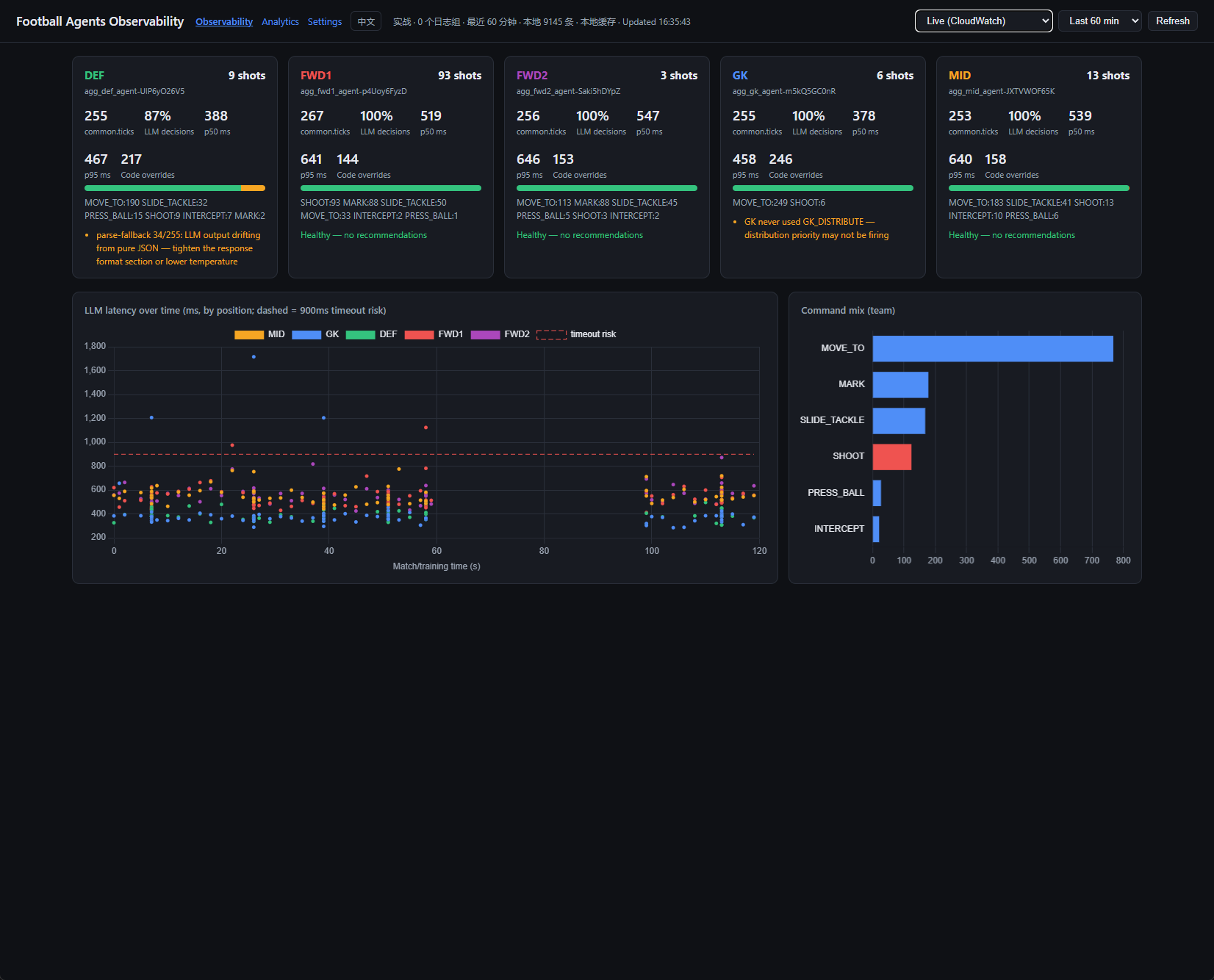
The home page renders one card per position: ticks, LLM decision share, p50/p95 latency, code override count, command mix, and auto-generated health hints, such as:
- DEF card:
parse-fallback 34/255: LLM output drifting from pure JSON — tighten the response format section or lower temperature - GK card:
GK never used GK_DISTRIBUTE — distribution priority may not be firing
Below sits the LLM latency scatter (colored by position, dashed line at the 900ms timeout-risk threshold — you can see at a glance which position keeps crossing it) and the team-wide command mix.
Training mode and Live-vs-Training comparison
The dashboard supports three data sources: Live (CloudWatch), Training ground (local logs), and a side-by-side comparison.
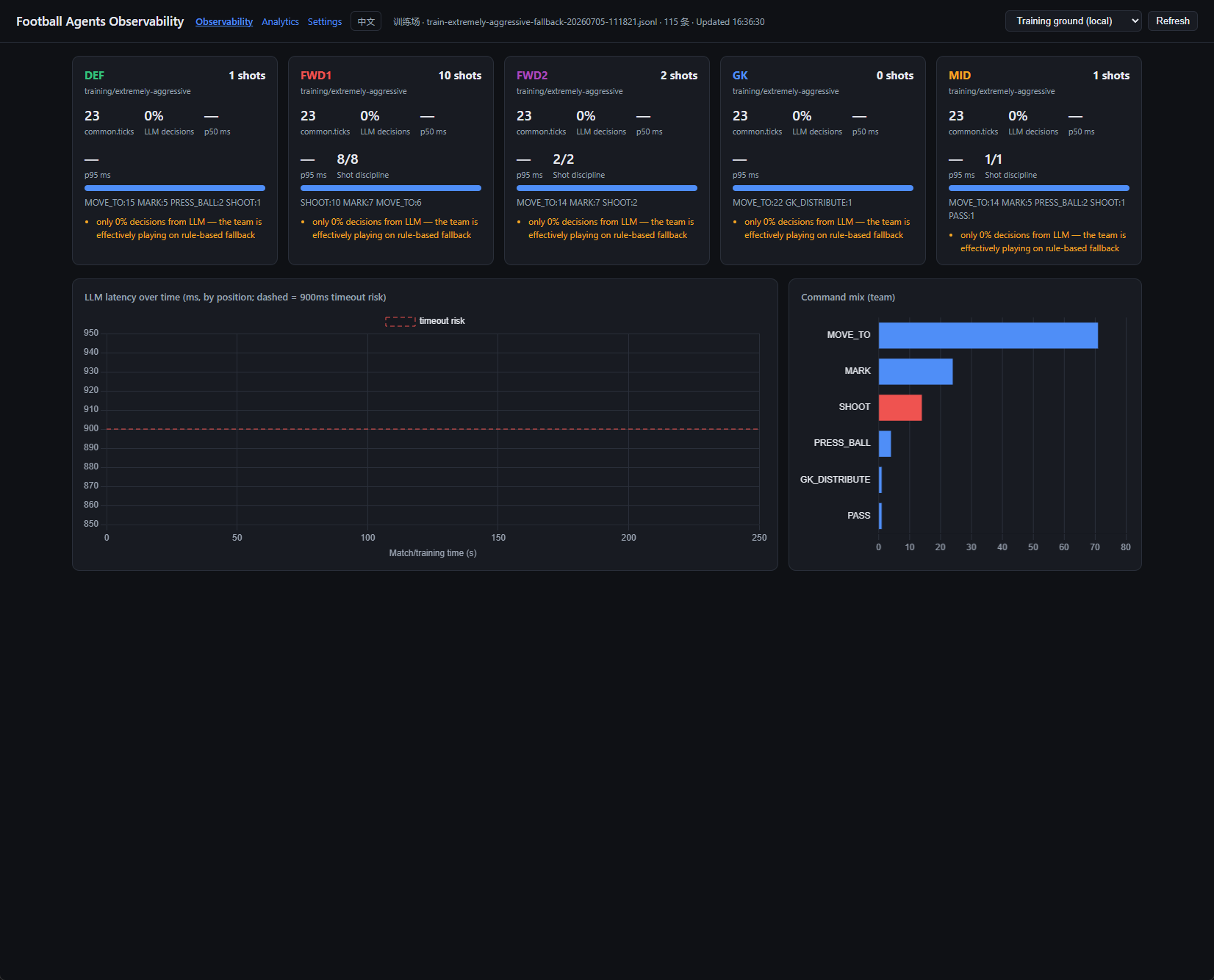
Training mode earned its keep immediately: in the session above, all five cards flagged only 0% decisions from LLM — the team is effectively playing on rule-based fallback. We thought we were testing prompts; we were actually testing rules. Without observability, that failure mode is nearly invisible.
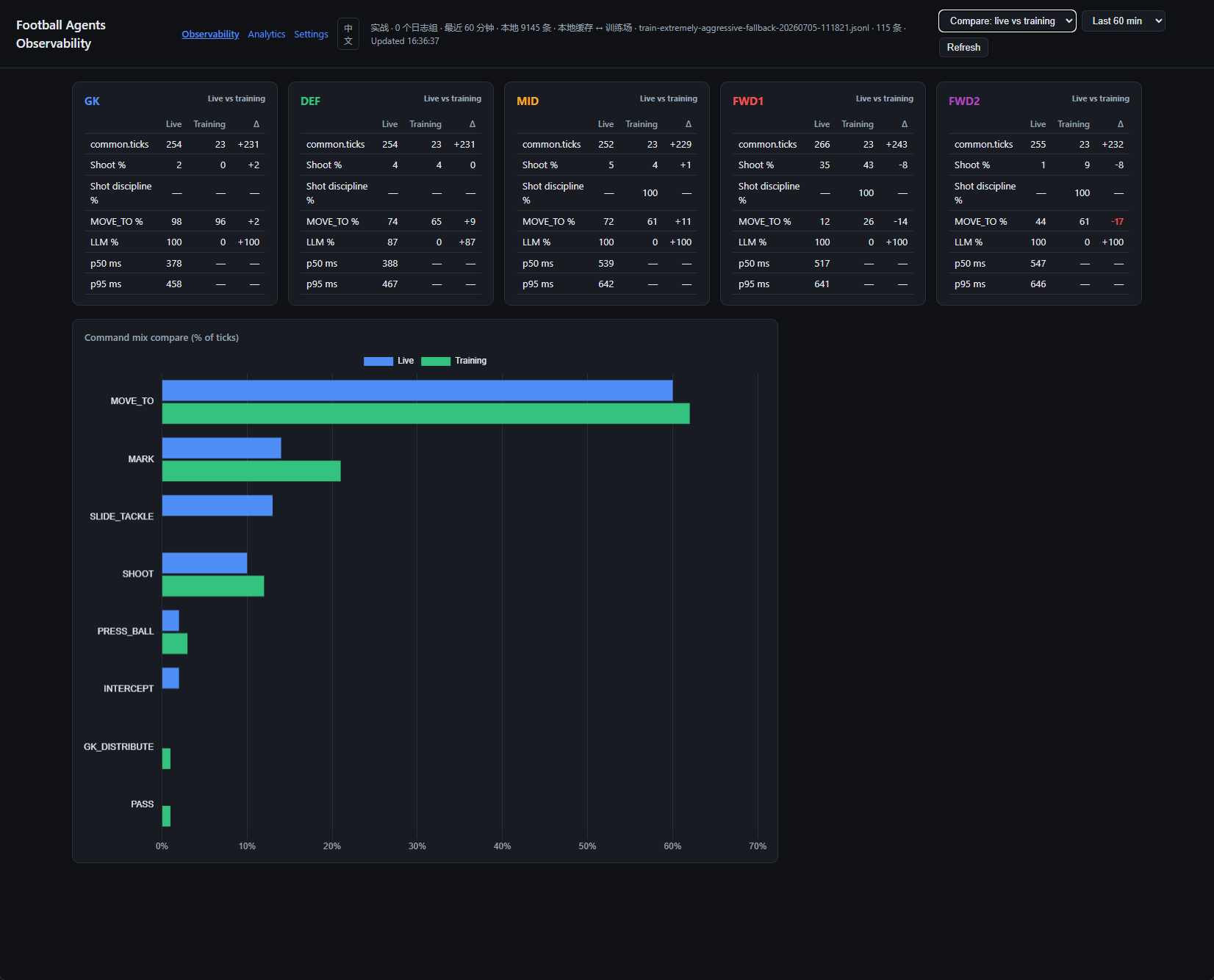
Comparison mode turns each position into a delta table and overlays the command mix as paired bars — edit a prompt, verify on the training ground, then check it against live data. That is the iteration loop.
Match analytics: splitting the sessions
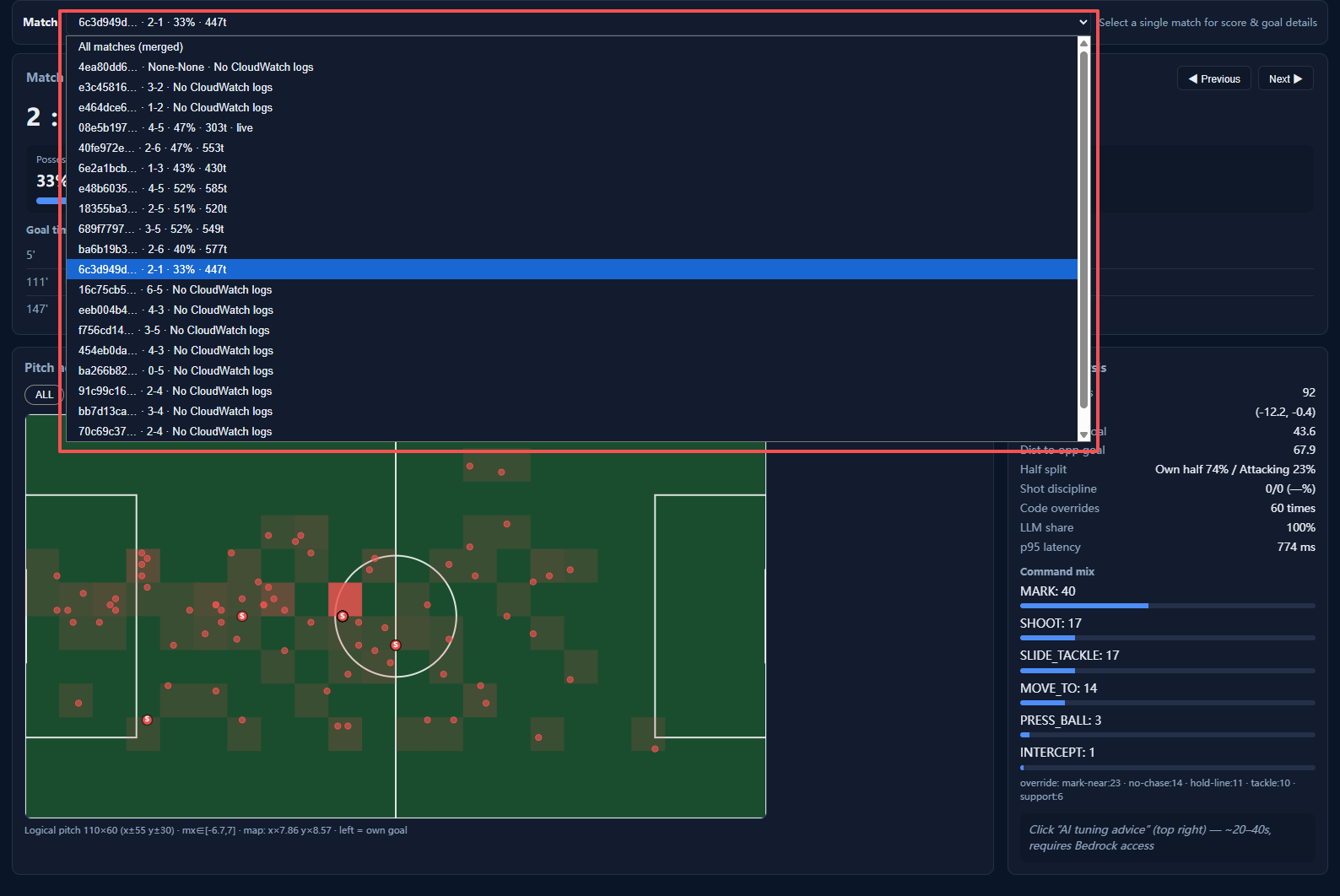
Here is a trap every team will hit: the game clock t in CloudWatch DECISION logs does not reset between matches. Grind a dozen games and a naive analysis merges them into one 7000-tick "supermatch". Our fix: split by the time windows recorded in grind_results.jsonl (start/end of every grind session), so the Analytics dropdown correctly lists 2-1, 6-5, 4-3… as separate matches. Matches without local logs keep their scores, labeled "No CloudWatch logs".
Player heatmaps
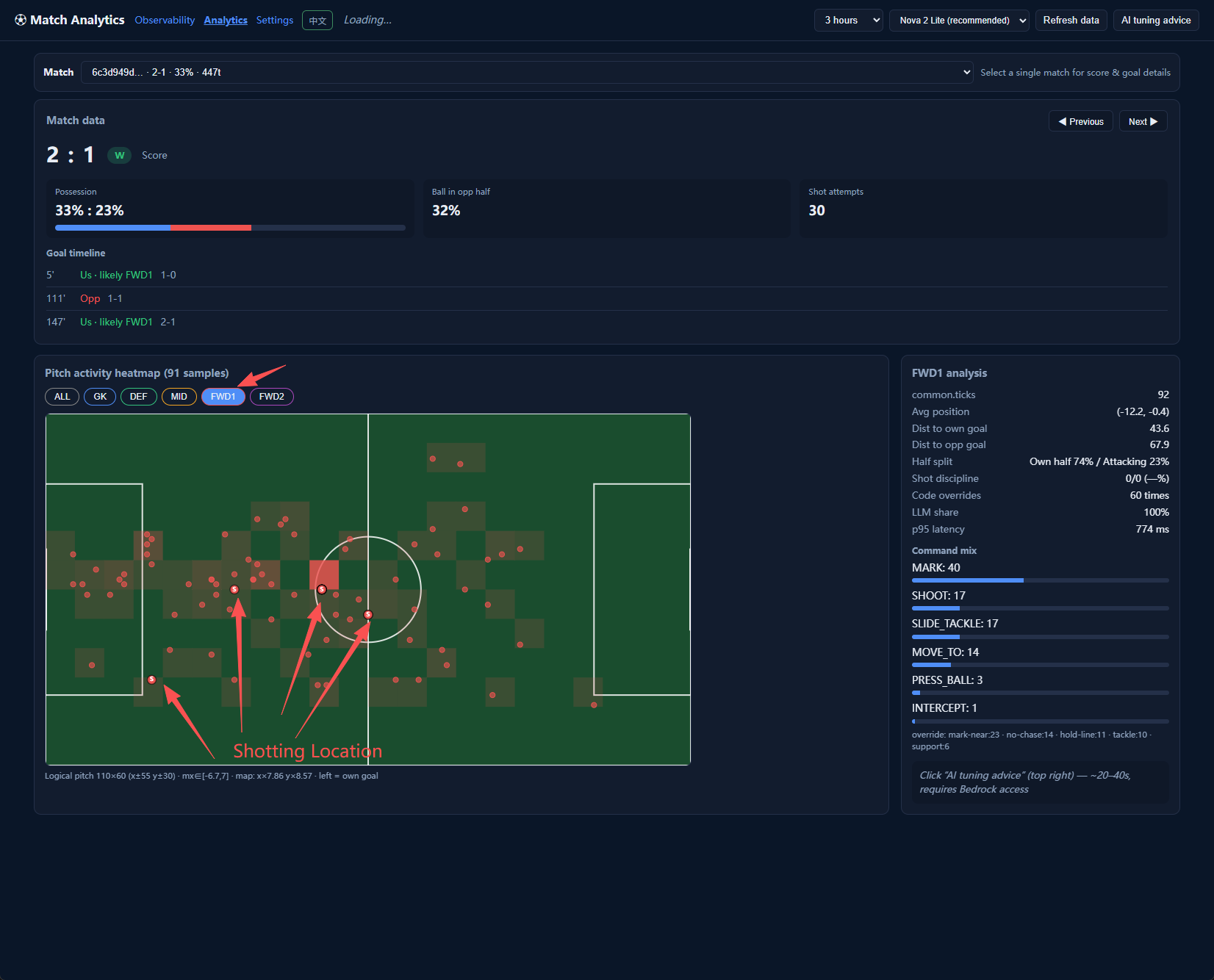
Heatmaps aggregate player coordinates from the DECISION logs, filterable by ALL / GK / DEF / MID / FWD1 / FWD2. The per-player panel on the right reports average position, distance to both goals, half split (this FWD1 spent only 23% of ticks attacking), shot discipline, override counts, and command mix.
The finding in this screenshot is a classic: FWD1's shot attempts cluster near the center circle (red arrows) — far too far out to convert. That single observation became the next prompt edit: "only shoot near the box."
AI modification suggestions
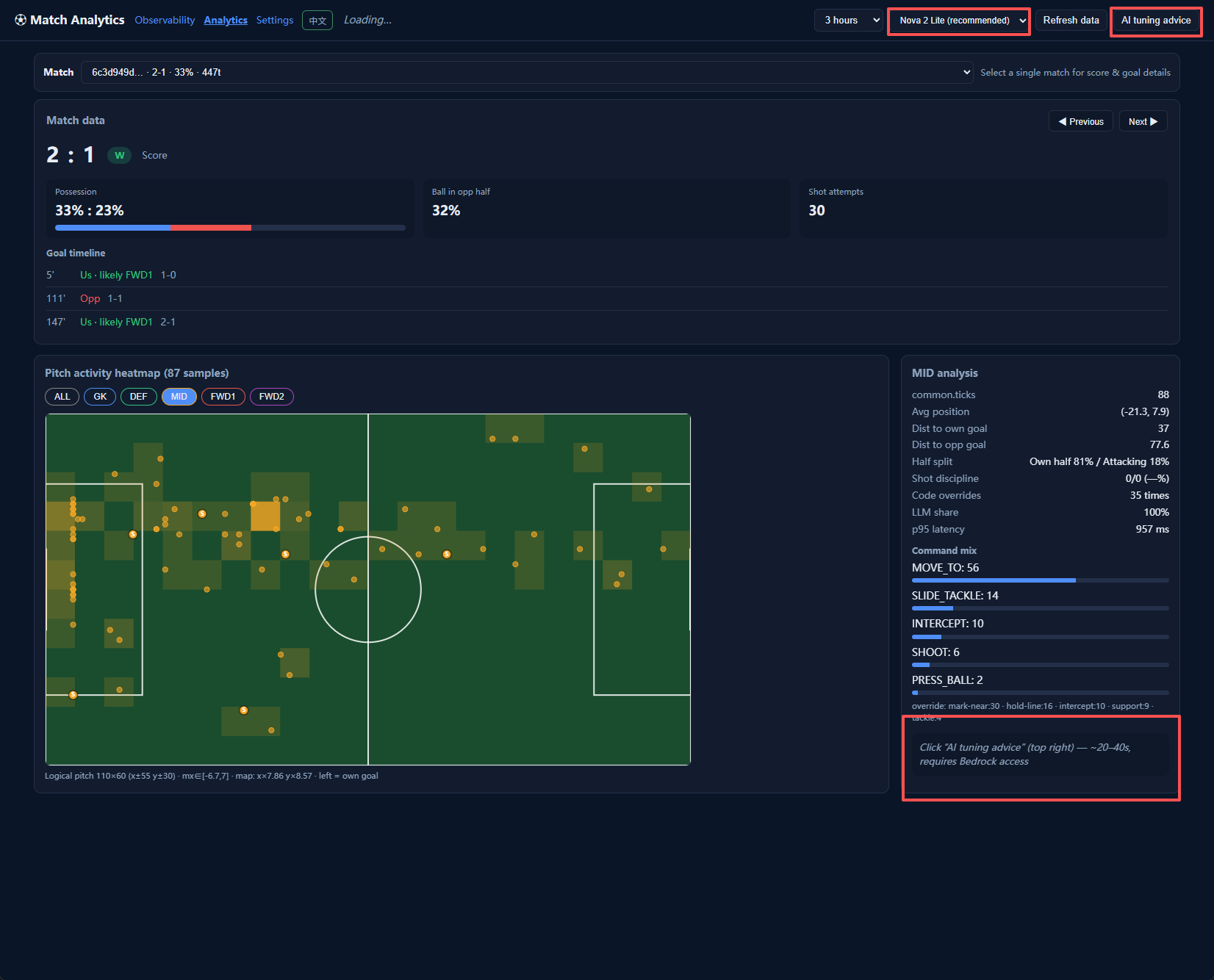
The "AI tuning advice" button (top right of Analytics) sends the current match's stats and DECISION samples to Bedrock and returns targeted suggestions in 20–40 seconds — which prompt to tighten, which position deserves a faster model, which override to add. The analysis model itself is switchable: Nova 2 Lite (recommended), Nova Lite, Nova Micro (fast), Claude Sonnet 4.6 / 4.5 / 4, Claude Haiku 4.5, Llama 3.1 8B — comparing how different models coach the same match is a fun side quest.
Settings: local-first data strategy
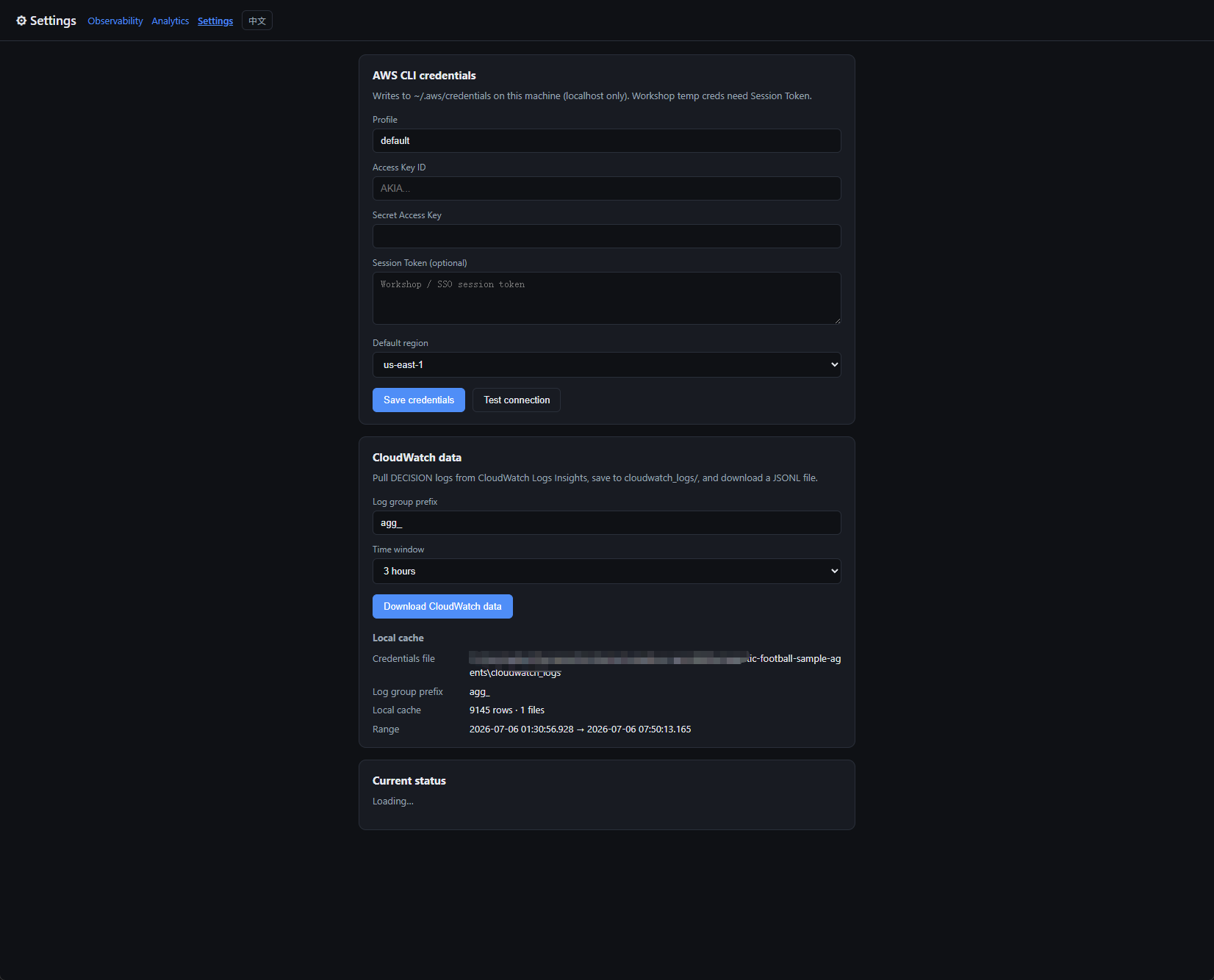
The dashboard is local-first: on startup it reads the cloudwatch_logs/ cache instead of hitting the CloudWatch API (fast, cheap, works offline). To sync, click Download CloudWatch data in Settings (choose prefix and time window) or Refresh data on the home page. Credentials support the Workshop's temporary STS tokens and are written only to the local ~/.aws/credentials.
Prefer the terminal? analyze_match.py prints the same per-agent stats as a CLI report.
Phase 4: Playwright Automation
Match grinding
Analysis needs data. A manual match takes half a dozen clicks plus four minutes of waiting, so we wrote portal_bot.py + grind_matches.py: Playwright drives the Player Portal — log in → schedule → watch → record the score to grind_results.jsonl — for N matches in a loop.
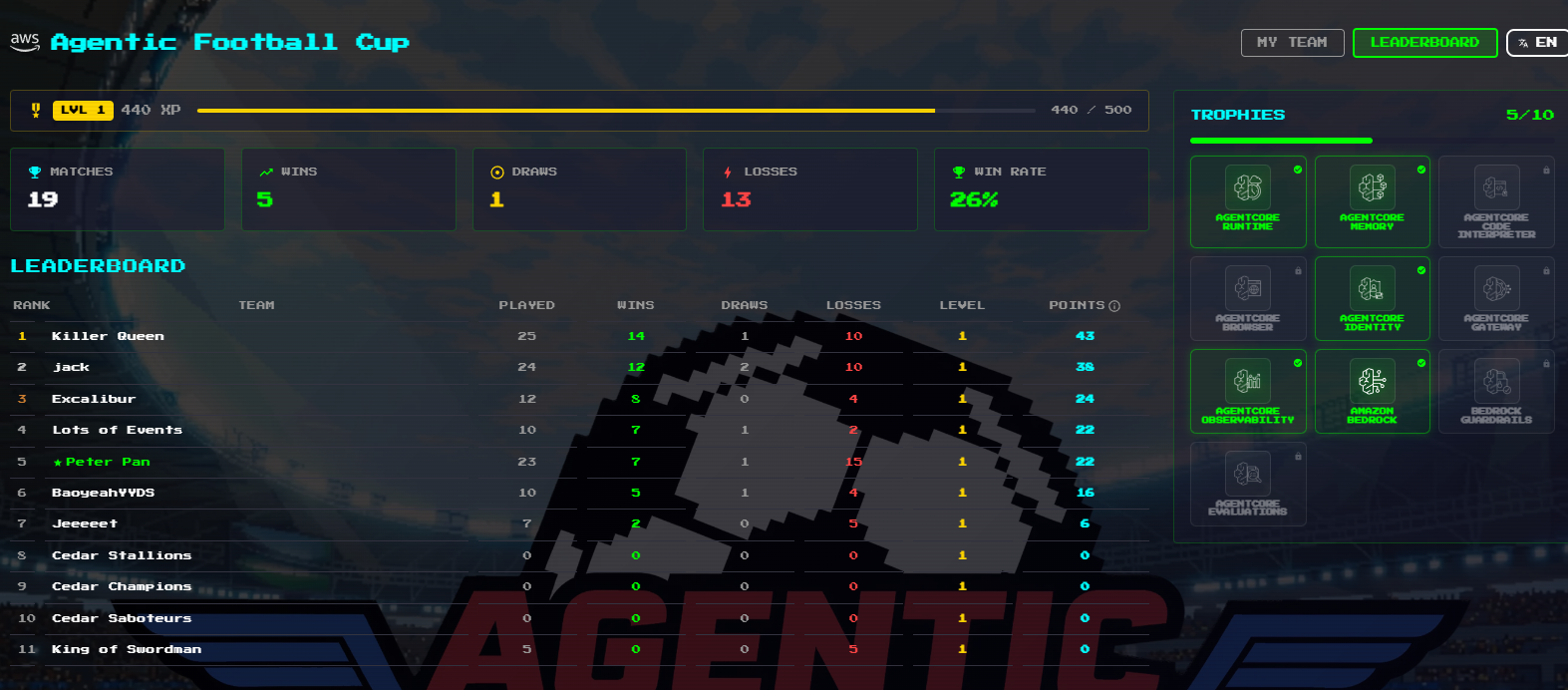
Over 72 hours we ground out 19 ranked matches (5W 1D 13L — a 26% win rate and 5th place; the data does not flatter us, but every match became a training sample). The repo also ships a more aggressive autopilot.py: a fully automated schedule → pull logs → analyze → tune → redeploy loop.
Live coach injection (experimental ⚠️)
Remember the coach shout box on the match screen? We tried using Playwright to inject tactical prompts mid-match automatically (e.g. shout "all-out attack" when trailing), automating the halftime adjustment too. The road was bumpier than expected and produced three findings:
- Free text gets rejected with a 400 — the shout channel only accepts 6 preset instructions (press_high, shoot_on_sight, slow_the_tempo, go_all_out_attack, …)
- Orders sent at the goal moment get swallowed — anything injected during the goal replay / kickoff cutscene vanishes; orders must be queued until the game clock resumes
- Delivery can be proven — we added a
co:1field to the DECISION log that fires only when a coach order actually reaches the LLM prompt
Those findings became the LiveCoach class (next chapter), but the win-rate impact is still inconclusive — more matches needed. PRs welcome.
Code Walkthrough: How the Agents Are Actually Built
Best read side by side with the repository; paths below are relative to
agentic-football-sample-agents/.
Repository map
agentic-football-sample-agents/
├── ai-team-strands-extremely-aggressive/   # main squad: one agent per position
│   ├── ai-gk/ ai-def/ ai-mid/ ai-fwd1/ ai-fwd2/
│   │   └── src/main.py          # ~80 lines each: prompt + three configs
│   ├── bench_latency.py         # per-position latency benchmark
│   └── deploy-all.sh            # deploy the whole squad
├── lib/                         # shared core (the interesting part)
│   ├── agent_base.py            # decision pipeline: LLM → parse → override → DECISION log
│   ├── state.py                 # compresses gameState into the prompt (injects COACH ORDER)
│   ├── tactics.py               # inline tactical math: shot odds / best pass / open space
│   ├── pattern_tracker.py       # cross-tick scouting memory (main threat, favored wing)
│   ├── overrides.py             # 11 deterministic tactical rules (star of this chapter)
│   ├── fallback.py              # per-position rule-based fallbacks
│   ├── parsing.py               # parses LLM JSON (survives Nova's inline arithmetic)
│   ├── tuning.py / tuning.json  # autopilot's control surface
│   └── match_analytics.py       # heatmaps / match splitting / match reports
├── observe_dashboard.py         # dashboard (+ analytics / settings / i18n modules)
├── portal_bot.py                # Playwright portal automation + LiveCoach
├── grind_matches.py             # batch grinding
├── autopilot.py                 # the fully automated iteration loop
└── analyze_match.py             # CLI report
One design rule: position entry points stay thin; everything shared lives in lib/. All five positions run the same pipeline, so a fix lands once and applies to the whole team — no copy-pasted player logic.
One player = ~80 lines of main.py
FWD1 (left striker) as the example — the entry file only does four things: write the prompt, pick the fallback, pick the overrides, pick the model (excerpt):
SYSTEM_PROMPT = f"""Ultra-aggressive left striker AI. You control ONLY player {MY_PLAYER_ID}
(FWD1) in 5v5 soccer. Each tick: read state, reply ONE command.

RULE #1 — SHOOT CENTER. Read TACTICS Shot line:
- "LANE CLEAR" / "POINT-BLANK" / "LANE BLOCKED": SHOOT CENTER power 1.0.
- Never dribble for a better angle inside 45m — shoot immediately.
...
Reply ONLY the JSON array, no other text:
[{{"commandType":"SHOOT","playerId":3,"parameters":{{"aim_location":"CENTER","power":1.0}},"duration":0}}]"""

# Rule fallback: only the designated player presses (no 5-man mobs);
# forwards operate on the left wing
AGG_FWD1_CONFIG = replace(FWD1_CONFIG, press_only_if_designated=True,
                          advance_y=-14.0, default_y=-14.0)

# Hard tactical rules: the prompt alone was ignored ~40% of the time
OVERRIDE_CONFIG = OverrideConfig(wing_y=-14.0)

# Nova 2 Lite: bench_models.py bake-off winner (100% JSON parse, tighter p95)
agent = create_agent(SYSTEM_PROMPT, model_id="us.amazon.nova-2-lite-v1:0")
create_invoke_handler(app, agent, MY_PLAYER_ID, POSITION_LABEL, fallback_commands,
                      fallback_cfg=AGG_FWD1_CONFIG, override_cfg=OVERRIDE_CONFIG)
Two prompt tricks worth stealing: feed the LLM solved tactical conclusions (the TACTICS Shot line is computed fresh every tick by tactics.py — shot lane clear or not, best pass target — so the LLM only maps conclusions to an action), and end with one complete JSON example to anchor the output format.
What happens inside one tick (agent_base.py)
Three engineering details:
- Four degradation layers:
llm → parse-fallback → error-fallback → last-resort. Whatever breaks, the player never stands still; the DECISION log'ssourcefield records which layer answered each tick - Latency is engineered, not hoped for:
max_tokens=200caps output length (the answer is one JSON command — cut the long tail), and memoryless agents resetagent.messagesevery tick — in a warm runtime, accumulated history inflates prefill latency on every call. Together these cut decision latency from ~1.5s to ~0.7s (commit8a4e3a5) - Memory ≠ stuffing history:
pattern_tracker.pydistills opponent behavior with in-process counters into a few scouting lines ("opponent #7 is the main threat, favors the left wing, their GK plays short") — cross-tick recall without context growth
The DECISION log: one JSON line powers everything
agent_base.py emits one structured line per tick — the single data source for every downstream tool:
{"pos":"FWD1","tick":57,"t":93,"source":"llm","cmd":"SHOOT","latency_ms":612,
 "hb":1,"dg":38.2,"mx":22.5,"my":-9.1,"hs":1,"as":1,
 "want":"MOVE_TO","fix":1,"ov":"shot","aim":"CENTER","co":1}
| Field | Meaning | Consumed by |
|---|---|---|
source | which layer decided (llm / parse-fallback / …) | dashboard "LLM share", the 0%-LLM alert |
hb / dg | had ball / distance to opponent goal | shot discipline (real chances vs blind hoofs) |
want vs cmd + fix | what the LLM wanted vs what ran; fix:1 = override corrected it | override effectiveness stats |
ov | which override fired this tick | analytics override breakdown |
mx / my | player coordinates | heatmaps |
hs / as | live score | match reports, goal timeline, match splitting |
co | a coach order reached the prompt | LiveCoach delivery proof |
Define this schema first and the dashboard, heatmaps, autopilot KPIs, and AI advice all share one language — observability as a first-class citizen of the pipeline, not an afterthought.
overrides.py: prompts suggest, code enforces
This 40KB file was born from getting slapped by data. The module docstring preserves the evidence: in one match, 207 of 370 commands were MOVE_TO and 0 were MARK — despite the prompt explicitly ordering "MARK when a teammate presses". The LLM answered 100% of ticks (fallback never ran), so any rule that lives only in the prompt is effectively optional. From iter-8 on, match-deciding rules became deterministic code:
| Override tag | Rule | Evidence |
|---|---|---|
blast | GK/DEF possession → instant full-power shot at the emptiest part of the frame (clearance + shot in one) | iter-9 |
build / launch / carry | with a clean lane, play the outlet pass / loft to the most advanced forward / carry up the wing; blast demoted to fallback | six matches of KPIs: 92–98% of shots were 45m+ hoofs donating possession |
shot | MID/FWD in range with a clear lane must shoot; a shot at a covered corner is re-aimed at the open one | |
counter | 3+ opponents in our half → one THROUGH ball to the most advanced open forward | |
phantom | SHOOT/PASS without the ball wastes the tick → rewritten into a real defensive job | |
no-chase / anchor | non-designated players don't chase; defensive runs far off the anchor line get clamped back | |
cutback / carry cap | all shot lanes blocked → cut back to an open teammate; dribble targets clamp at the box edge | 1-5 / 0-4 loss forensics |
tackle / gk-smother | the designated presser inside tackle range slides; the GK smothers loose balls in our box | "defense only marks, never tackles" observation |
route-one | pressed with every ground outlet shut → loft it to the most advanced forward | validation match: far_shot_ratio 1.0, forwards 0 shots |
Every trigger leaves an ov tag in the DECISION log, and the analytics page counts them — whether a rule works is measured, not felt. The blast → build → route-one evolution (iter-9 → 11 → 12b) was forced by our own KPIs: first learn to hoof, then learn when not to.
tuning.json + autopilot: let the machine turn the knobs
Override thresholds (shot range, mark radius, press bodies…) shouldn't be hand-edited. lib/tuning.json is a parameter overlay shipped with every deploy, and autopilot.py runs a closed loop around it:
KPIs include far-shot waste, possession height, siege indicators, and override counts. The tuner is bounded-deterministic by default; --llm-advisor swaps in Nova to read the KPIs and propose deltas. Consecutive losses force exploration; wins freeze the config. The loop's first full run produced our first win, 3-2 against the aggressive bot (commit fffd0fa).
LiveCoach: turning the coach into code
The LiveCoach class in portal_bot.py subscribes to the live narration feed and maps situations onto the 6 preset shouts:
if conceded:               return ("conceded",  "press_high")        # win it back now
if scored and diff > 0:    return ("scored",    "slow_the_tempo")    # keep the shape
if diff < 0 and late:      return ("chase-late","go_all_out_attack") # nothing to lose
if diff < 0:               return ("chase",     "shoot_on_sight")    # our identity
if diff > 0 and late:      return ("protect",   "slow_the_tempo")    # hold the line
The hard-won lessons live in the comments: goal-triggered orders are queued until the game clock resumes (otherwise the replay cutscene swallows them), with a 45s cooldown and same-situation dedupe to avoid flooding. Orders are injected into every agent's prompt by state.py as a top-priority COACH ORDER (obey immediately), and the DECISION co:1 field proves delivery. One shout steers five LLMs at once — the win-rate impact is still unproven, but the mechanism itself is worth the price of admission.
The iteration story in the git history
40+ commits, numbered by iteration, tell a data-driven evolution:
| Commit | Milestone |
|---|---|
8a4e3a5 | Decision latency ~1.5s → ~0.7s (reset history + cap max_tokens) |
8758e20 iter-4 | First web observability dashboard + shoot-first policy |
5814a00 iter-5 | Local training ground + live/training compare view |
d17a3d3 iter-8 | Overrides are born: prompts suggest, code enforces |
bd30b57 iter-9 | Counter-attack system + GK/DEF unlimited blast |
276e4e2 iter-10 | Autopilot loop + Playwright portal bot |
fffd0fa iter-10 | First win 3-2 after data-driven tuning |
3d035bc iter-11 | Build-from-back: fixing the "95% far-shot waste" |
9880ce6 iter-11d | Attacking trio moved to Nova 2 Lite (picked by a real bake-off) |
5030547 | Parser learns to eat Nova's 55*0.75 inline arithmetic |
055fbd8 iter-12 | Finishing + ball-winning package (from 1-5 / 0-4 loss evidence) |
8acd3ce iter-12b | Route-one launch to beat the high press |
3f0b8b4 / cc2dbac | Match analytics, session splitting, deployment docs open-sourced |
Every iter commit names the match and the metric that motivated it — arguably the best habit in this repo.
Install & Usage
Commands verified on Windows PowerShell; on macOS/Linux replace \.venv\Scripts\ with bin/.
0. Prerequisites
| Tool | Requirement | Used for |
|---|---|---|
| Python | 3.10+ | Dashboard and scripts |
| AWS credentials | Workshop temporary STS or long-lived | CloudWatch reads, Bedrock calls |
| Team Code | Assigned by the workshop | Playwright match scheduling |
| A deployed team | Repo README sections 1–5 | No agents, no DECISION logs |
1. Clone
git clone -b football-workshop https://github.com/peterpanstechland/sample-ai-possibilities.git
cd sample-ai-possibilities/agentic-football-sample-agents
2. Python environment
python -m venv .venv
.\.venv\Scripts\Activate.ps1
pip install -r requirements-observability.txt
python -m playwright install chromium   # only needed for the grinding scripts
3. AWS configuration
copy .env.example .env
# Edit .env: Workshop STS credentials + AAFC_TEAM_CODE
Or start the dashboard and fill in the Settings page (writes to your local ~/.aws/credentials, Session Token supported).
4. Start the dashboard
$env:AWS_DEFAULT_REGION = "us-east-1"
.\.venv\Scripts\python.exe observe_dashboard.py --prefix agg_ --minutes 180 --port 8777
--prefix is your runtime log prefix (log group /aws/bedrock-agentcore/runtimes/agg_* → agg_). Open http://127.0.0.1:8777/; the language toggle is top right.
| Route | Purpose |
|---|---|
/ | Observability: position cards, latency scatter, Live vs Training |
/analytics | Match analytics: score, heatmaps, AI tuning advice |
/settings | AWS credentials + CloudWatch download |
On first use, click Download CloudWatch data in Settings once — every page then loads from the local cache.
5. Grind matches (optional)
$env:AAFC_TEAM_CODE = "your team code"
.\.venv\Scripts\python.exe grind_matches.py --count 5
Back in /analytics, the dropdown lists each session split by the grind_results.jsonl time windows.
6. Full reference
- CLI report:
analyze_match.py --prefix agg_ --minutes 30 - Fully automated loop:
autopilot.py(schedule → pull logs → tune → redeploy) - Complete docs:
docs/OBSERVABILITY.md(architecture, env var table, FAQ: Bedrock 403, match splitting, and more)
Connection to AWS Summit Shanghai 2026
This was not my first encounter with Agentic Football Cup. At AWS Summit Shanghai 2026 I competed on-site via Harness — the official site captions that day as "120+ builders, one unforgettable match day".
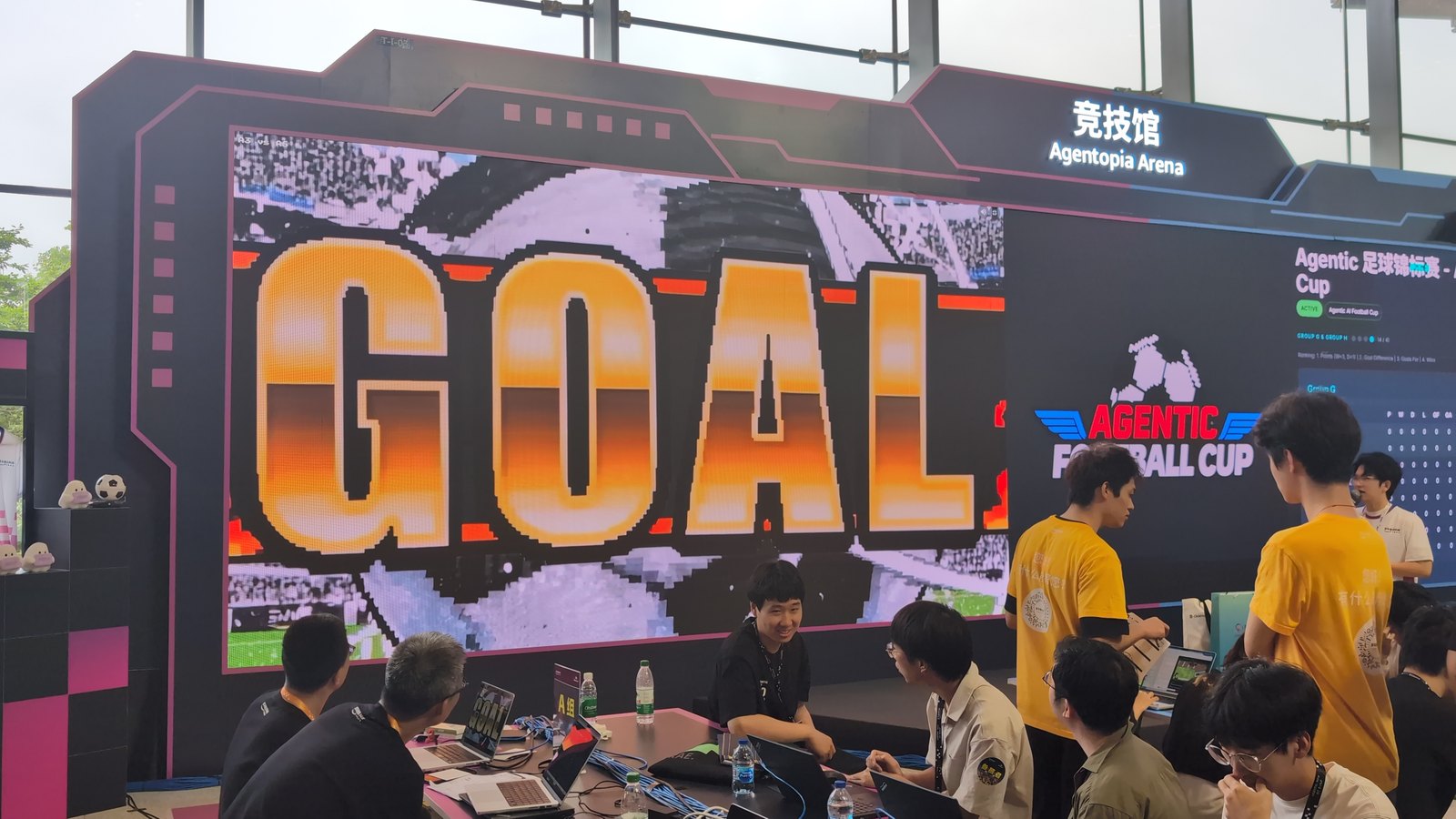
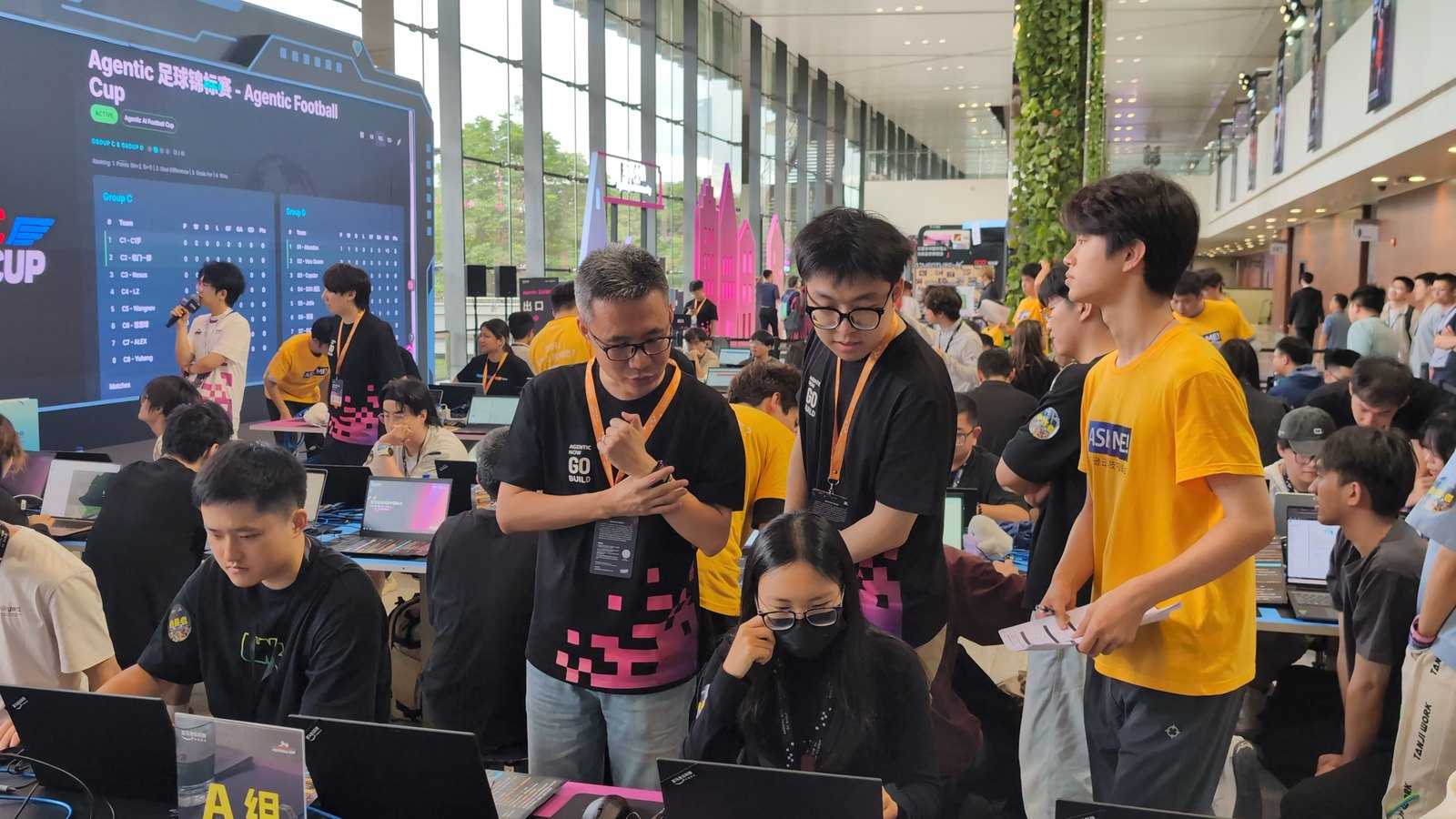
Event photos above: agenticfootballcup.com
That day I also had the pleasure of meeting the game's author — that visit was about discovering how fun it is.
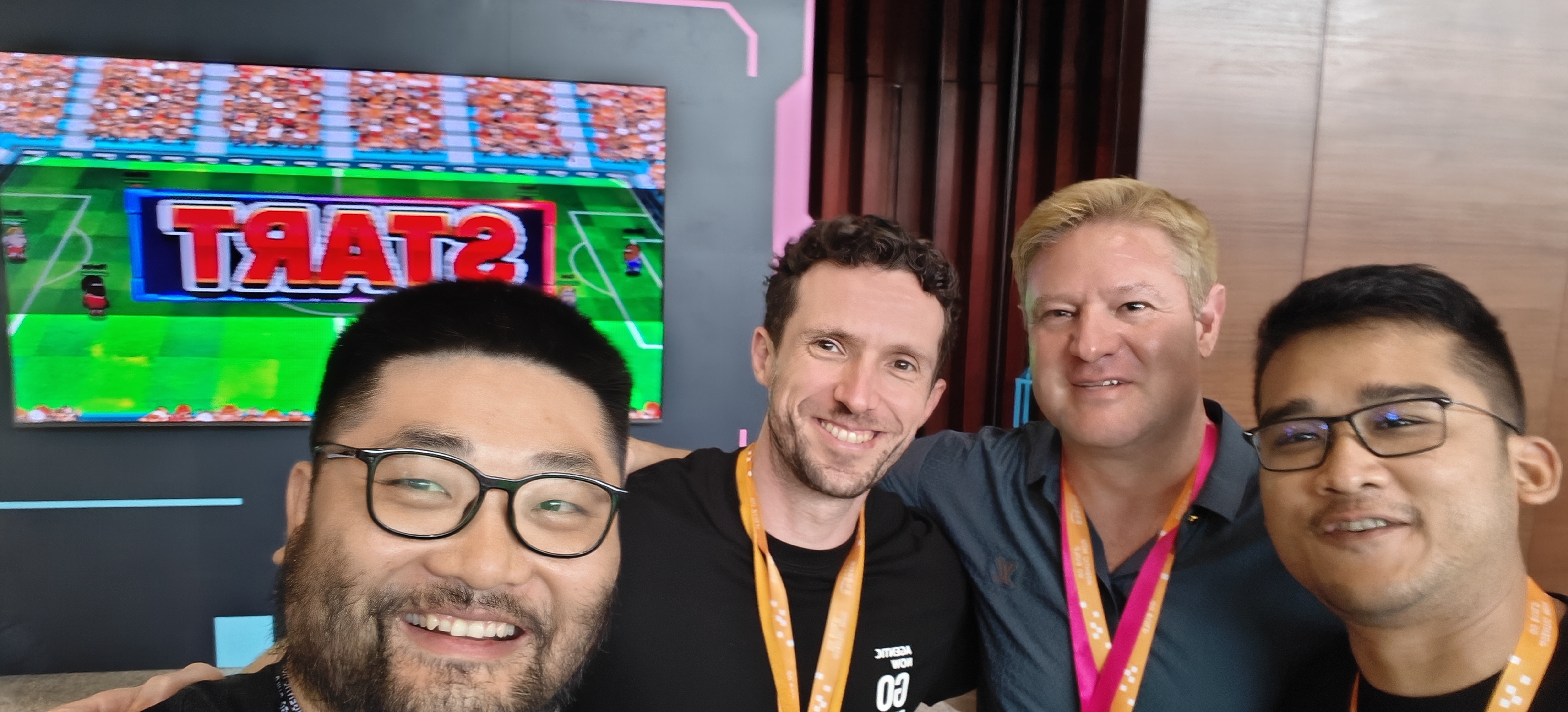
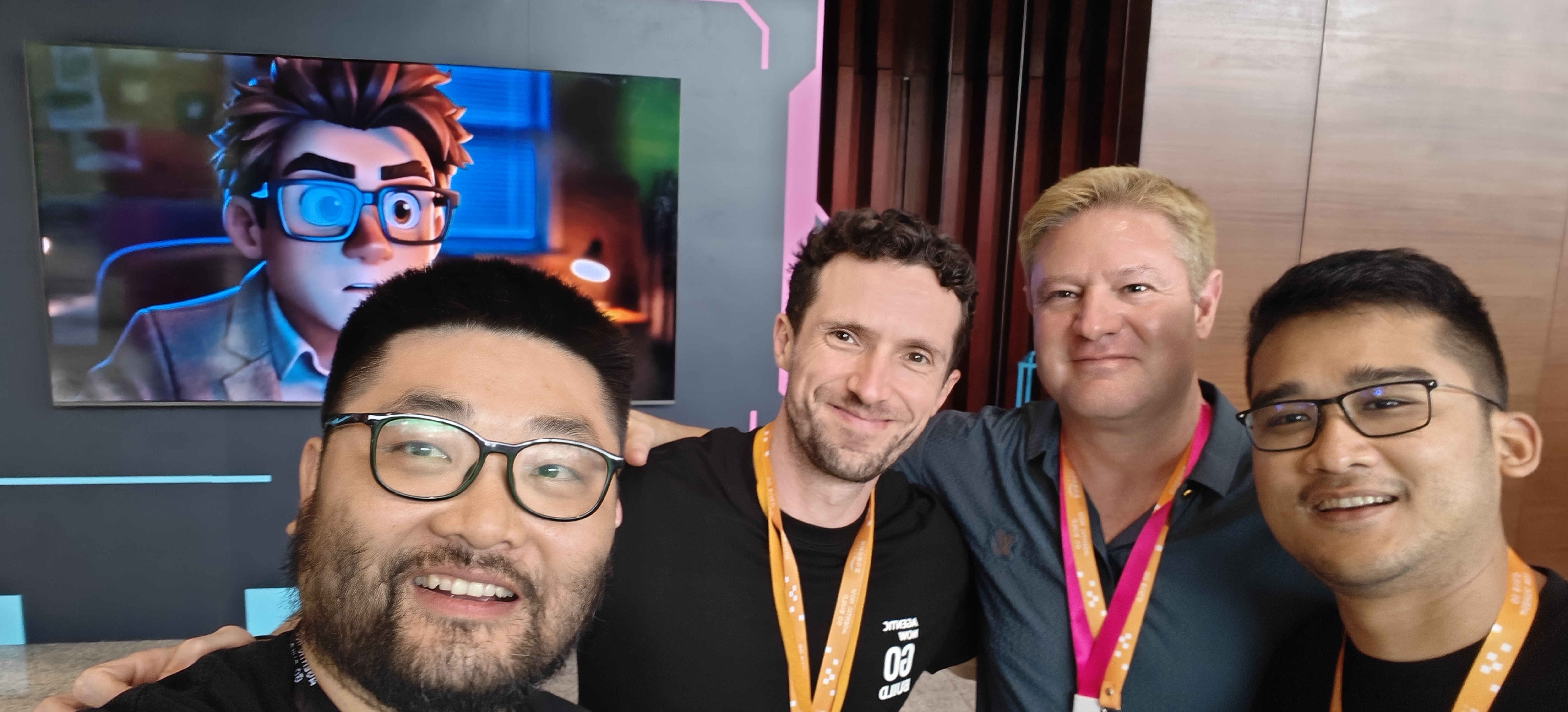
This 72-hour pre-test was the systematic follow-up: Harness → local deploy → batch grinding → heatmaps and AI advice. If Shanghai was the demo, this was writing the coach's handbook and toolchain for the Beijing UG Workshop.
Summary
| Takeaway | Detail |
|---|---|
| AgentCore end-to-end | Harness deploy → local agents → Runtime matches; one team = five independent agents |
| Game mechanics | ~2s/tick, command set, 900ms timeout, overrides, per-position models |
| Observability | CloudWatch DECISION → local cache → dashboard (caught a "0% LLM decisions" incident) |
| Data-driven tuning | Heatmap exposed center-circle shooting; latency scatter exposed slow positions; Bedrock advice |
| Automation | 19 matches ground via Playwright + an autopilot loop; coach injection still TBD |
| Community | 72-hour pre-test + Jul 5 live stream, paving the way for Beijing |
We had a great time and genuinely learned AgentCore along the way. If you are joining the Beijing or an online Agentic Football Cup workshop (signup at agenticfootballcup.com), take our open-source toolchain with you — issues and PRs welcome. And remember: completing a workshop qualifies you for the global league, and group winners play live on stage at AWS re:Invent 2026 in Las Vegas.
One last hope: may the Agentic Football Cup scene in China keep growing, and may Chinese builders fight all the way to the re:Invent 2026 finals and represent China in Las Vegas. Our men's national football team may keep letting us down, but we believe our agents can win without a sea-cucumber diet (a beloved running joke about the national squad's famously pampered nutrition). ⚽
AWS China UG · Agentic Football Cup Pre-Test Team · July 2026